EXTRAIRE ET ARCHIVER DES PROJETS JIRA
Découvrez comment archiver de manière efficace vos données en dehors de Jira.
Que ce soit pour des contraintes légales, financières ou autres, il est nécessaire d’extraire des données en dehors de votre instance Jira afin de les conserver.
Pour cela, nous avons développé une expertise et un plugin, Aquarius, qui vous permet d’archiver vos demandes.
- Toutes les informations contenues dans votre Jira sont exportées
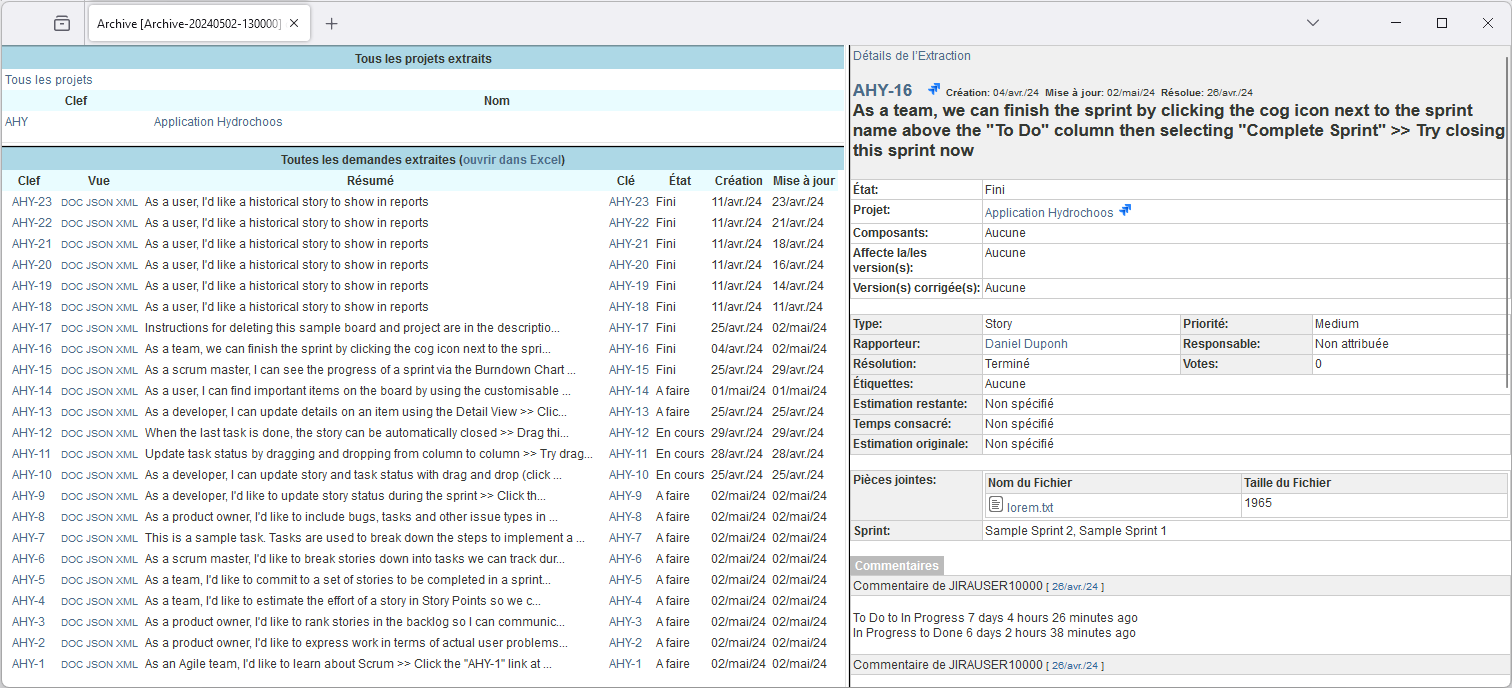
(champs systèmes, champs personnalisés, historique, pièces jointes,…), - Dans un format facilement navigable, similaire aux référentiels d’API, depuis n’importe quel navigateur, en ligne ou hors-ligne et accessible sans licence,
- Ou bien dans des formats correspondants à vos besoins particuliers
(Word, JSON, XML,…), - De manière immédiate ou programmée.

Notre plugin Aquarius, disponible pour Jira Server et Data Center
Vous voulez migrer votre Jira dans le Cloud ou en Data Center ?
Faciliter votre travail de migration
Pour une migration réussie, la première étape est de nettoyer les données anciennes ou inutilisées avant la migration afin d’accélérer celle–ci et les performances de l’instance cible.
Or, bien souvent, certaines demandes doivent être conservées. Aquarius permet d’extraire les projets identifiés comme « hors du périmètre de la migration« . Ces données extraites sont ainsi stockées et accessibles en dehors de Jira et dans le format choisi.
Une fois l’instance Jira nettoyée des données hors périmètre, la migration devient plus simple et l’instance cible Cloud ou Data Center sera moins chargée en terme de données et de paramétrages.
Retrouver vos données facilement
Dès que vous aurez téléchargé le fichier d’archive Zip, vous pourrez le stocker dans un endroit compatible avec les exigences futures comme un disque partagé (NAS) ou un Sharepoint par exemple.
Ensuite les demandes Jira extraites sont disponibles en lecture seule avec l’ensemble des informations disponibles comme les liens, champs et pièces jointes.
Vous souhaitez booster les performances de votre instance ?
Votre Jira montre des signes de fatigue ?
Il contient des projets que vous n’utilisez plus et des configurations inutiles ? Il est temps d’archiver pour redonner à votre Jira ses performances d’antan !
Jira Data Center vous propose déjà une méthode d’archivage intégrée qui permet à l’administrateur de cacher des demandes ou des projets à la vision de tous. Cependant, ces projets sont uniquement sortis de la recherche mais subsistent dans votre Jira. Et leurs configurations inutiles encrassent les rouages de votre application.
Extraire les données et nettoyer la configuration
Avec Aquarius, vous pouvez exporter toutes les informations contenues dans vos projets dans un format facilement navigable, avec accès direct aux pièces jointes depuis n’importe quel navigateur, en ligne ou hors-ligne. Ainsi, vos données restent accessibles en dehors de Jira et vous pouvez les supprimer de Jira pour alléger la pression sur votre serveur et nettoyer toutes les configurations inutiles.
Décommissionner Jira Server ou Data Center ?
Ça y est, la décision a été prise de quitter Jira …
Que ce soit pour rejoindre une solution concurrente, déjà en place dans votre entreprise ou pas, pour des raisons budgétaires, organisationnelles ou fonctionnelles. Peu importe les causes, de tels changements peuvent avoir des conséquences, surtout si vous souhaitez garder vos données !
Quelles solutions se présentent à vous ?
Reprendre les données dans le nouveau système, trop coûteux et non retenu !
Conserver l’application Jira dans le temps … au delà des questions de licences, cela implique de garder l’infrastructure et sécuriser au mieux l’instance qui ne disposera plus de montée de version …
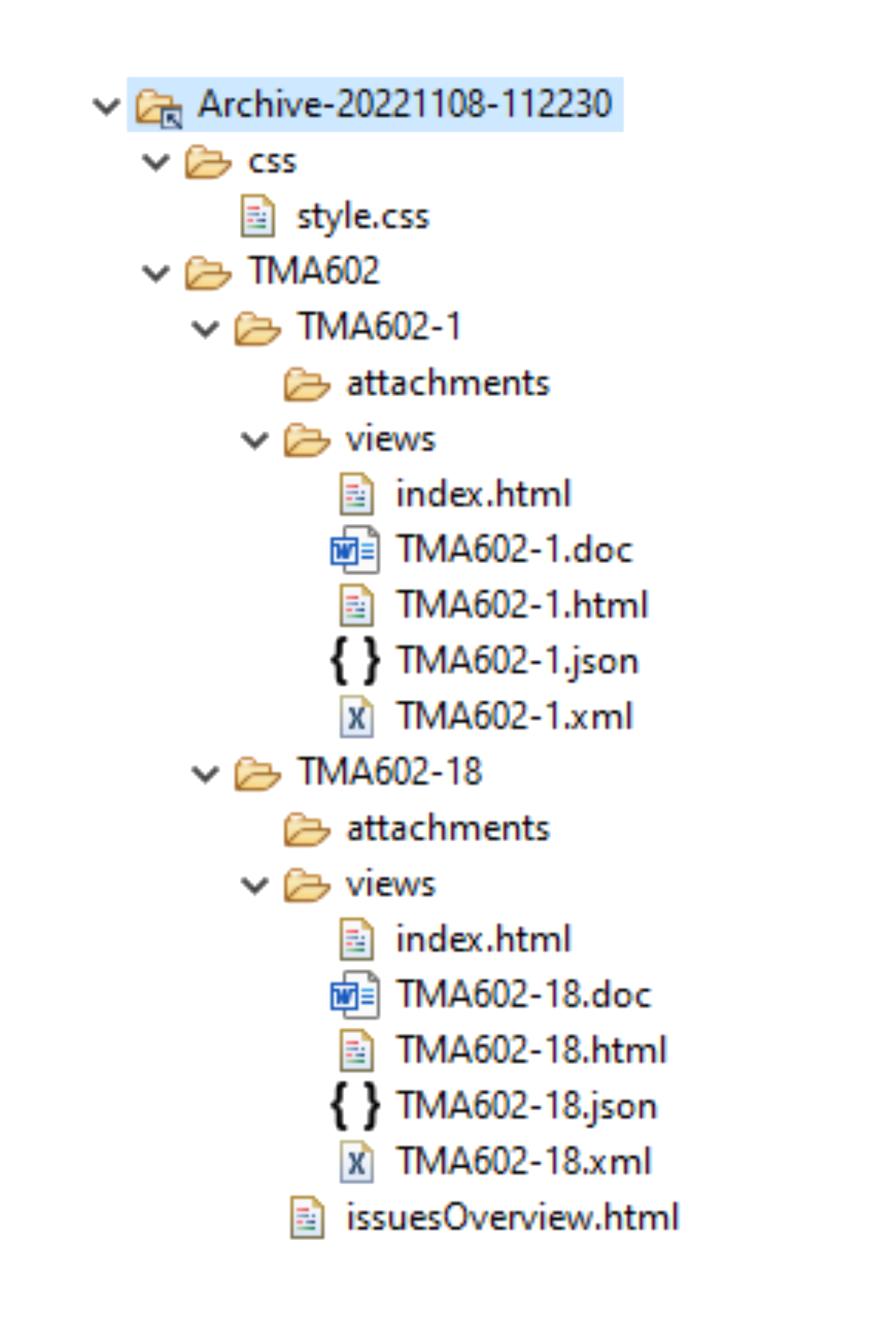
Avec notre solution Aquarius for Jira, nous vous proposons tout simplement de procéder à une extraction complètes de vos projets au travers d’une archive structurée.
Et plus encore …
Aquarius sera utile pour de nombreux cas d’usages :
- Pour fournir un accès à une partie des données stockées dans certains de vos projets Jira à certains auditeurs (comptabilité, processus, sécurité ou autre), sans donner un accès complet à votre instance Jira.
- Votre Jira n’est accessible que sur l’Intranet et vous devez fournir certaines informations stockées dans votre Jira à des personnes externes.
- Dans le cadre du RGPD, vous devez fournir une extraction de tous les demandes Jira dans lesquels un client est mentionné.
Contactez-nous !
Vous souhaitez être accompagné dans vos projets de migration de données, d’archivage et d’extraction ?
Vous désirez plus d’informations sur le coût de cette solution ? N’hésitez pas, écrivez-nous !